How much JPEG compression can an AprilTag tolerate?
A paired benchmark measures how JPEG quality, tag size, and viewing angle affect AprilTag detection.
Published:
computer-vision / robotics / image-compression
At JPEG quality 20, the detector decoded 2,984 of 3,000 AprilTags on held-out scenes with nominal tag widths of at least 32 px and yaw up to 65°. All 16 misses came from one view, a nominal 32 px tag at 65° yaw. PNG decoded all 120 tags at that view. Q20 decoded 104. Held-out counts by size and angle
The same frame, encoded both ways
An AprilTag encodes its ID in a grid of black and white cells. The detector looks for a quadrilateral, then samples the pattern inside it [1]. I measure nominal tag width across the black border with the tag facing the camera. At an angle, the tag's cells cover fewer pixels. JPEG quantization can change the contrast between cells that already occupy only a few pixels.

I rendered one tag36h11 marker per 640 × 480 frame, using procedural backgrounds and photographs from BSDS500 and COCO128 [2, 3]. Each held-out photo or procedural seed contributed ten tag sizes and six yaw angles. All views and encodings of a given photo or seed stayed together, leaving 120 background groups for evaluation and 240 for development. I used the same full-resolution detector on each encoding [4]. Benchmark methods · Archived run audit · Benchmark code and data on GitHub

Small tags lost more detections
At Q20, recall fell from 54.3% to 43.8% for the 12, 16, 20, and 24 px tags. Among the 64, 96, and 128 px tags, the detector read 2,159 of the 2,160 it read in PNG. The loss in recall was 10.47 percentage points greater for small tags than for large tags, with a 95% bootstrap interval of 9.51 to 11.48 points. The bootstrap resampled whole background groups to keep related views together. Primary comparison
| Encoding | Mean file size | Correct-ID recall |
|---|---|---|
| PNG | 496.7 KB | 70.4% |
| JPEG Q70 | 38.2 KB | 69.3% |
| JPEG Q20 | 16.3 KB | 64.8% |
Across all 7,200 held-out scenes, Q70 cut the mean file size by 92.3%. The 1.1-point drop in recall combines two paired outcomes. JPEG lost 112 tags that PNG could read and recovered 32 that PNG missed. File sizes include image headers and use decimal kilobytes. Q values are settings for Pillow's JPEG encoder [5]. Pooled held-out results
What happened at 65° yaw
On development scenes in the selected size and angle range, Q20 was the lowest setting to meet the pooled targets. It and every higher tested quality had to reach 99% recall, lose at most 1% of tags detected in PNG, and keep the 95th-percentile corner error within 0.5 px. Development quality sweep
At the same nominal 32 px width, Q20 decoded all 120 held-out tags at 55° yaw. At 75°, outside the range used to select Q20, even PNG decoded just three.
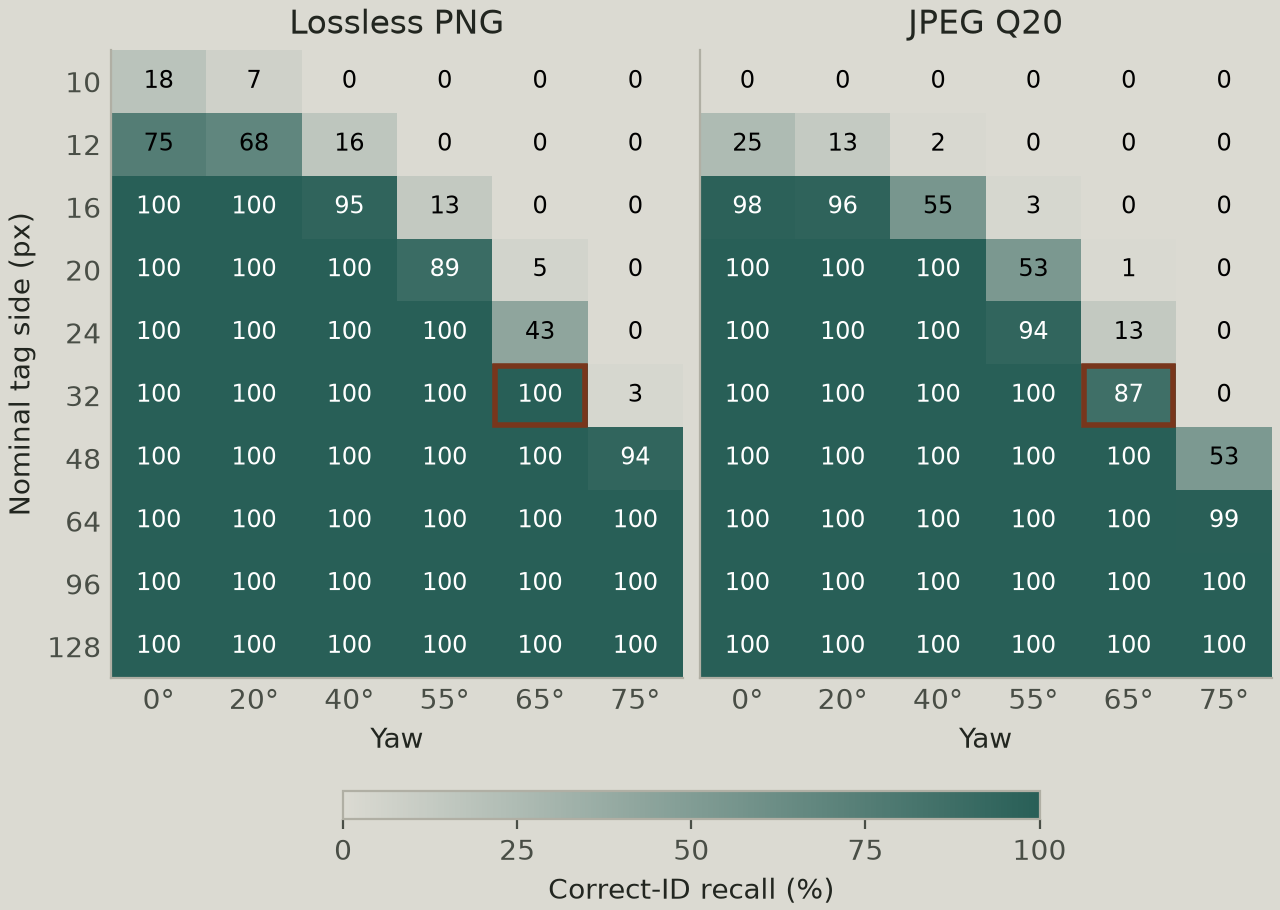
At that view, Q40 and Q50 each decoded 118 of 120 tags. Q60 was the first JPEG setting in the sweep to decode all 120, at an average of 31.9 KB per frame. That's about twice the size of Q20 and 6.4% of the PNG size for this view. I compared those settings on the same held-out scenes that exposed the misses. I'd try Q60 on a physical camera and check whether it holds up on fresh frames of that approach. Quality sweep at 32 px and 65°

Start with the hardest view your camera needs to read
Every marker in this benchmark was rendered, including those on photographic backgrounds. On a physical camera, start with lossless frames at the distances and angles the tag will actually be seen. If the detector already misses the tag in those frames, check marker size and blur before tuning compression.
Encode those same frames at several JPEG settings and count which detections disappear in the views that matter to the robot. If you use the tag for pose estimation, measure how far the detected corners move on tags both encodings can read.
References
[1] E. Olson, "AprilTag: A Robust and Flexible Visual Fiducial System," IEEE International Conference on Robotics and Automation, 2011, pp. 3400–3407. Published paper · Author's copy, Sections III-B and IV
[2] P. Arbeláez, M. Maire, C. Fowlkes, and J. Malik, "Contour Detection and Hierarchical Image Segmentation," IEEE Transactions on Pattern Analysis and Machine Intelligence, vol. 33, no. 5, pp. 898–916, May 2011. Published paper · Berkeley BSDS500 dataset
[3] Ultralytics, "COCO128 Dataset," Ultralytics documentation. Dataset documentation
[4] Pupil Labs, pupil-apriltags 1.0.4.post11, Python Package Index. Version used · AprilTag 3 detector source
[5] Pillow contributors, "Image File Formats," Pillow documentation. JPEG encoder options